Top 10 Media Asset Management (MAM) Software in 2026
Ten MAM and DAM platforms compared on what's actually verifiable — Forrester and Gartner recognitions, published pricing pages, real G2 review counts, and documented acquisition history — instead of vague vendor-pitch phrasing.
Last updated: August 2026 · By Alex Graham, who has spent the better part of a decade reviewing digital and media asset management tools and sitting through more vendor demos than anyone should reasonably admit to.
The one thing nobody tells you about choosing a MAM
Every platform looks good in a demo. The search is snappy, the interface is gorgeous, the vendor rep has an answer for everything. Then you go live, and within a few months you find out either that nobody on your team actually opens it, or that you’re paying for a governance engine you don’t need while missing the one feature you do.
The difference between picking right and picking wrong usually isn’t the feature list — it’s whether the platform’s design center matches how your team actually works. A brand governance engine built for a 40-country retailer is overkill for a five-person creative team. A developer-first API platform is the wrong tool if your marketers just need to drag a file in and find it again next month.
This guide breaks down ten MAM and DAM platforms with what actually matters: verifiable strengths, real gotchas, scoring across the criteria your decision hangs on, and a clear read on who each one is actually built for.
What is media asset management (MAM)?
Media asset management is software that stores, organizes, finds, and ships rich media — video and audio primarily, but increasingly images, documents, and 3D files too — from a metadata-driven library. What separates a MAM from a glorified cloud drive is that it understands media specifically: it generates lightweight preview proxies of large video files so editors can scrub footage without pulling the multi-gigabyte original, tags content by timecode, tracks usage rights, and routes approved assets straight to editors or broadcast.
In practice, that turns “where did we put that file” into “here’s the file, its rights status, and every prior version, in a couple of clicks” — including automated background work like overnight batch transcoding and proxy generation that nobody has to babysit.
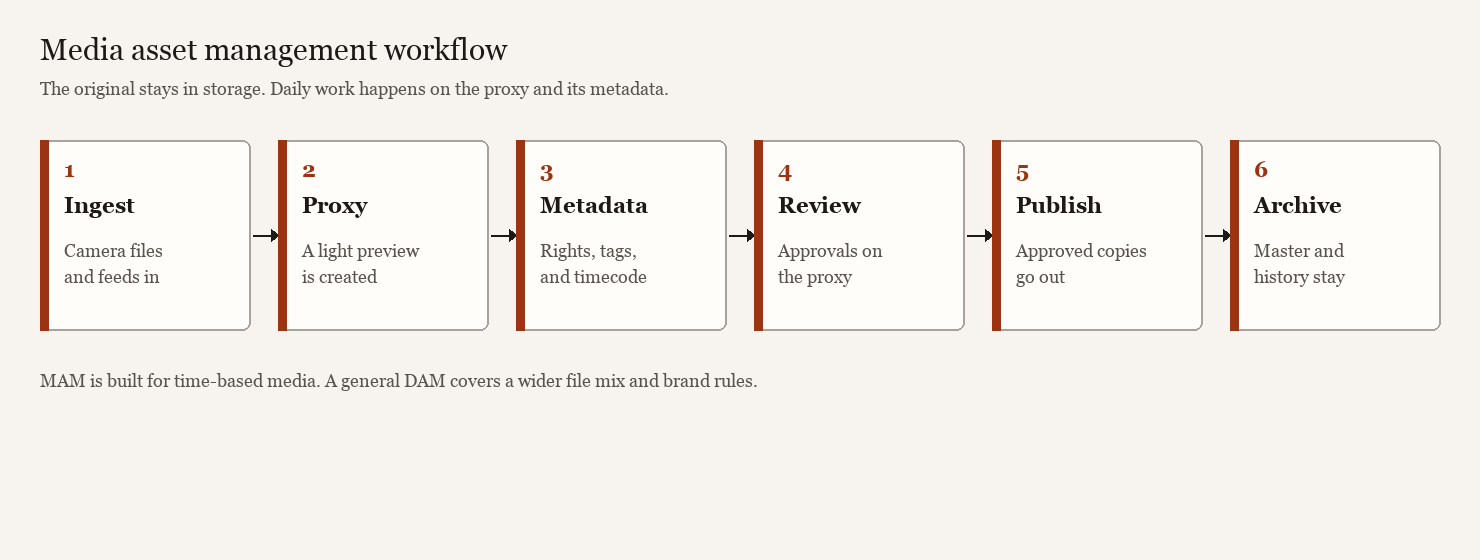
- Ingest. Camera files and feeds enter.
- Proxy. A light preview is created.
- Metadata. Rights, tags, and timecode are attached.
- Review. Approvals happen on the proxy.
- Publish. Approved copies go out.
- Archive. The master and its history stay.
The short definition sits in the MAM glossary. If the library is mostly long-form footage, compare video asset management before using the wider shortlist below.
MAM vs DAM: the distinction that might save you money
These acronyms get mixed up constantly, and for many teams that’s harmless because the categories have blurred over the last several years. But the difference is real and can reshape your shortlist.
Digital Asset Management (DAM) grew up in marketing and brand teams. It handles a wide mix of file types — logos, product shots, PDFs, social graphics, the occasional video — and is built around brand governance, keyword and color search, and approval workflows. It’s the single source of truth for what a brand publishes.
Media Asset Management (MAM) came out of broadcast and post-production, where the asset is the video. A MAM does the heavy lifting a classic DAM shrugs off: ingesting raw footage, transcoding, generating frame-accurate proxies you can scrub without touching the master, and pinning metadata to timecodes so an editor can find “the 12 seconds where the CEO mentions the new product” instead of re-watching 40 minutes of keynote footage.
Rule of thumb: mostly images and brand collateral with the occasional video, a DAM works fine. Producing and archiving terabytes of footage every week, you want MAM-grade video handling. Because video now dominates so much content production, most platforms below have folded meaningful MAM features into what started as a DAM core — which is why the line has gotten blurry in the first place.
How we evaluated these platforms (and what that actually means)
Every claim in this article that isn’t obvious editorial opinion was checked against vendor sites, analyst reports (Forrester, Gartner), and current review-site data from G2. Where a platform made a specific claim — Bynder’s Forrester Wave recognition, MediaValet‘s Azure footprint, Frame.io’s pricing tiers — it’s cited below with a source and, where the number is the kind that moves over time, a date. Where pricing is genuinely quote-only, we’ve said so plainly instead of guessing.
One thing that holds true across nearly every deal we’ve seen: the license is rarely the whole bill. Implementation, integration, data migration, training, and ongoing IT support routinely add a meaningful chunk on top of the sticker price — often somewhere in the neighborhood of a fifth to a quarter of the annual license fee in year one, sometimes considerably more for a complex enterprise rollout with custom workflows. Budget the full stack, not the quote.
The 10 best media asset management software in 2026
1. Daminion — best for on-premise control and keeping finance department sane
Daminion is the one platform here that doesn’t assume your assets belong in someone else’s cloud. It runs on-premise, hybrid, or cloud, and the on-prem option is its core argument: files sit behind your own firewall on your own storage, a relief for manufacturers, government agencies, architecture and engineering firms, and anyone tired of a per-gigabyte cloud bill that only moves one direction. Daminion’s own figures put it at more than 900 organizations and 1.4 million-plus users across 50+ countries as of 2026 — self-reported, but consistent with two decades in the category.
The metadata engine is the other reason people stay. Tagging, facial recognition, color search, AND/OR filtering — all written straight to file metadata (IPTC/XMP), so annotations travel with the files even when they leave the system. Photographers in particular tend to be vocal fans of how it handles RAW formats.
The economics are straightforward: pay once for the server and storage you provision, and the bill doesn’t move even if your archive doubles. A cloud DAM billing per gigabyte can flip that math within a couple of years for a heavy video or RAW-photo archive.
Scoring:
- Search & Metadata: 5/5 (excellent RAW and color support)
- Video Capabilities: 3/5 (handles it, not specialized)
- Brand Governance: 2/5 (minimal)
- Integration Depth: 3/5 (mainly Adobe via plugins)
- Ease of Use: 3/5 (functional, not flashy)
- Cost Efficiency: 5/5 (the rarest win — cheap and stays cheap)
Pros: Real data sovereignty, genuine metadata depth, predictable costs even at large scale.
Cons: Interface feels more workshop than gallery, you own your own backups, no built-in image editor.
Best for: SMBs through large enterprises that want control and a budget line that doesn’t need board sign-off.
2. Canto — the all-rounder teams actually keep using
Canto is where teams land when they want a capable, modern DAM without a six-month implementation. Cloud-native, clean interface, quick to learn — and it’s one of the most-reviewed DAMs on G2, sitting at 1,767 reviews and a 4.4 average as of August 2026, which is the rare combination of widely adopted and broadly liked rather than just one or the other.
Collaboration is the hook: real-time access, brand portals for outside partners, and AI search that includes frame-level video search — jumping straight to the right timestamp instead of scrubbing. An optional DAM-for-Products layer helps when brand assets and product content collide. Canto’s own site cites 4,000+ brands on the platform, and a customer quoted there puts the payoff bluntly: “With Canto, we’re easily 20-25% more efficient in terms of time saved for marketers, graphic designers, and customer service.”
Adoption tends to be fast because the interface doesn’t fight how people already work.
Scoring:
- Search & Metadata: 4/5 (AI-powered, frame-level video)
- Video Capabilities: 4/5 (solid frame search and proxies)
- Brand Governance: 3/5 (present, not primary)
- Integration Depth: 4/5 (good suite of native connectors)
- Ease of Use: 5/5 (fastest onboarding in the category)
- Cost Efficiency: 4/5 (mid-range, reasonable)
Pros: Fast adoption, strong portals and collaboration, large and genuinely satisfied review base, solid value relative to enterprise rivals.
Cons: No public pricing — you’ll be filling out a form — and some reviewers find it pricier at the lower tiers.
Best for: Mid-sized to large marketing, media, and education teams that want a dependable workhorse, not a weekend project.
3. Acquia DAM (Widen) — best for product-led enterprises
Acquia DAM is the platform many people still call Widen Collective. Widen’s roots go back to 1948, when it started as a Wisconsin engraving shop making printing plates for newspapers — close to eight decades of company history before Acquia acquired it in September 2021 and folded it into its broader Drupal-centric platform. The DAM kept Widen’s reputation for being endlessly configurable and backed by a support team people actually praise.
Product content is where it earns its keep. Six modules — Assets, Entries, Insights, Portals, Templates, Workflow — and the Entries module lets product companies build a genuine 360-degree view of their media, cascading parent values down to every variant. The metadata schema is among the most flexible in the category, AI auto-tagging helps as libraries grow, and it connects to a solid roster of native tools plus a first-party Drupal integration — unsurprising, given Acquia’s roots in Drupal hosting.
Teams that lean into the product-content side end up using it less like a file library and more like a system of record for every SKU’s media.
Scoring:
- Search & Metadata: 5/5 (custom taxonomy, AI tagging)
- Video Capabilities: 3/5 (handles it, not specialized)
- Brand Governance: 3/5 (adequate)
- Integration Depth: 4/5 (broad connector library, Drupal native)
- Ease of Use: 3/5 (power over simplicity)
- Cost Efficiency: 3/5 (enterprise quote, typically mid-range)
Pros: Outstanding metadata configurability, serious product content chops, support team consistently praised.
Cons: Some users report sluggish performance on very large files, stock portals are plain.
Best for: Product-heavy enterprises and retailers that need structured, scalable asset and product content.
4. Bynder — best for enterprise brand governance (and the most recent innovation)
Bynder is the polished enterprise option brand leaders reach for when consistency at scale is the whole game. Governance is its strength: centralized brand guidelines, an interactive style guide, digital rights management, and content workflows that keep internal teams and outside agencies aligned in one place.
In its Q1 2026 report, The Forrester Wave: Digital Asset Management Systems, Forrester named Bynder a Leader, gave it the top score in Strategy, and tagged it a “Customer Favorite,” with top marks in 13 criteria including AI capabilities and pricing transparency. On the product side, Bynder acquired an AI-search company in 2023, stood up Bynder AI Labs the next year, and launched its Agentic platform in 2025 — AI agents aimed at content enrichment, governance, and compliance work.
“Bynder received high praise, too, for overall value and ROI — with one customer indicating that the DAM system saves them millions of dollars.”
The Forrester Wave: Digital Asset Management Systems, Q1 2026
The interface is sharp and onboarding gets praised consistently. The modular build lets you add Studio (creative automation), Content Workflow, and other pieces as you go — which is also where the cost creeps. Bynder doesn’t publish pricing, but third-party trackers that aggregate signed contracts (Vendr, Uplifted) put entry-level deals around $450/month, with documented annual contracts ranging roughly $12,000 to over $79,000 depending on modules and user count. Price the configuration you’ll actually need, not the base package in the demo.
Scoring:
- Search & Metadata: 4/5 (solid, good AI)
- Video Capabilities: 3/5 (adequate)
- Brand Governance: 5/5 (the best in class)
- Integration Depth: 4/5 (extensive, well-maintained)
- Ease of Use: 5/5 (beautiful, fast onboarding)
- Cost Efficiency: 2/5 (expensive, modular pricing)
Pros: Best-in-class brand governance, slick UI, current Forrester Leader recognition, active AI investment.
Cons: Opaque, modular pricing that climbs quickly, real overkill for a small team.
Best for: Large enterprises wrangling complex, multi-market brands where off-brand is not an option.
5. MediaValet — best for global, security-first enterprises
MediaValet is built entirely on Microsoft Azure, and that’s the whole pitch, not a footnote. By its own account it runs across 61 Azure regions spanning 140 countries, which gives it a genuinely global footprint and the security and compliance posture that makes risk-averse IT departments relax a little. If you’re already a Microsoft shop, the fit is unusually clean.
G2 named it a Market Leader in its Spring 2026 DAM Grid Report, and the platform brings AI tagging, brand portals, approval workflows, and solid video management. A few marquee features — Experience Portals, templating, advanced AI, CDN linking — live behind paid add-ons rather than the base tier, so scope the real cost before you sign.
Teams often choose MediaValet for the Azure infrastructure alone, not the feature checklist — a narrow but defensible reason to buy when data residency is non-negotiable.
Scoring:
- Search & Metadata: 4/5 (AI-powered)
- Video Capabilities: 4/5 (strong)
- Brand Governance: 3/5 (present)
- Integration Depth: 3/5 (Microsoft-heavy)
- Ease of Use: 4/5 (smooth, modern)
- Cost Efficiency: 3/5 (enterprise quote)
Pros: Exceptional global infrastructure and security, deep Azure integration, strong market standing.
Cons: No published pricing at all, several key features cost extra, Microsoft-centric ecosystem.
Best for: Global, security-conscious enterprises — especially Microsoft-centric ones — with high asset volumes.
Discover more about MediaValet
6. Brandfolder — best for visually-driven brand teams
Brandfolder has been part of Smartsheet since Smartsheet acquired it for $155 million in September 2020, and it still leans hard into a visual, intuitive interface. It’s the kind of system non-technical stakeholders actually enjoy opening, which is most of the adoption battle. Its customer roster includes Mastercard and McLaren Racing, among others named in Smartsheet’s own case studies.
Beyond the basics, it handles product data well, supports content creation with in-app design templates, and can push assets straight to print. It carries itself like an enterprise tool because it’s priced and positioned as one.
The practical test isn’t which tool has more features on paper — it’s which one the team actually opens every day, and for brand teams specifically, Brandfolder tends to win that test.
Scoring:
- Search & Metadata: 3/5 (visual-first, functional)
- Video Capabilities: 2/5 (basic)
- Brand Governance: 4/5 (very good)
- Integration Depth: 3/5 (solid basics)
- Ease of Use: 5/5 (the most intuitive)
- Cost Efficiency: 2/5 (premium pricing)
Pros: Beautiful, frictionless interface, strong usage analytics, excellent for brand consistency.
Cons: Premium entry point, pricing not transparent, more than a smaller team typically needs.
Best for: Enterprise brand and marketing teams that want a gorgeous, governance-ready library.
7. Adobe Experience Manager Assets — best for all-in Adobe shops
If your creative team basically lives in Photoshop, Illustrator, and Premiere, AEM Assets erases the seam between managing assets and making them. Files sync into Creative Cloud, and the AI underneath is a two-part story: Sensei is Adobe’s insight and automation layer (tagging, search, attribute analysis), while Firefly is the generative side — a model family trained on Adobe Stock, openly licensed, and public-domain content so the output is safe for commercial use. Adobe Express with Firefly is now wired into AEM Assets so teams can auto-generate channel variations — different colors, backgrounds, or crops for web, mobile, and email — from one source asset.
This is the heavyweight of the list, and it acts like one. Enterprise scale, omnichannel distribution, deep personalization when paired with Experience Cloud — and complexity and cost to match. Per our own scoring, it’s the priciest and least beginner-friendly option here, and implementation is a genuine project, not a setup wizard.
The trap is a familiar one: teams pick AEM because they’re already on Creative Cloud, then discover months in just how deep the integration goes — deep enough that walking away gets expensive too. Not necessarily a bad trade, but go in aware of it.
Scoring:
- Search & Metadata: 4/5 (AI-powered)
- Video Capabilities: 4/5 (solid)
- Brand Governance: 3/5 (adequate)
- Integration Depth: 5/5 (unmatched with Creative Cloud)
- Ease of Use: 2/5 (powerful, complex)
- Cost Efficiency: 1/5 (the most expensive)
Pros: Unmatched Creative Cloud integration, powerful AI, true enterprise scale.
Cons: Most expensive and complex option; serious overkill unless you’re all-in Adobe.
Best for: Large, Adobe-committed enterprises that need creation and asset management fused at the hip.
Dive into Adobe Experience Manager Assets
8. Cloudinary — best for developers and dynamic media delivery
Cloudinary is the deliberate odd one out. It’s a media platform built for developers first — upload, transform, optimize, and deliver images and video via API — with a DAM layer (Cloudinary Assets) on top. If you’re a product or engineering team that needs media programmatically resized, reformatted, and served fast at scale, nothing else on this list is in the same conversation.
It’s also a rarity here for having a genuine free tier and fully published pricing instead of a quote-form gauntlet. Per Cloudinary’s own pricing page (checked August 2026): Free is $0/month for 3 users and 25 monthly credits; Plus is $89/month billed annually (225 credits); Advanced is $224/month billed annually (600 credits); Enterprise is custom. One credit covers 1,000 transformations, 1GB of storage, or 1GB of bandwidth — so a heavy video workload can chew through an allowance fast, the one real gotcha in an otherwise transparent model.
Scoring:
- Search & Metadata: 2/5 (basic, developer-focused)
- Video Capabilities: 4/5 (strong delivery and transformation)
- Brand Governance: 1/5 (not the focus)
- Integration Depth: 5/5 (API-first, built for integration)
- Ease of Use: 4/5 (easy if you’re technical)
- Cost Efficiency: 4/5 (free tier, transparent pricing)
Pros: Best-in-class dynamic delivery, transparent published pricing, real free tier, fast time-to-value for technical teams.
Cons: Usage-based credits can surprise at scale, poor fit for non-technical marketers.
Best for: Developers and technical teams at startups through mid-market companies who need scalable media optimization without building a delivery pipeline in-house.
9. Frame.io — best for video review and collaboration (and speed)
Frame.io, acquired by Adobe in a deal worth $1.275 billion that closed in October 2021, is the closest thing here to a pure broadcast-style MAM — video-native to the bone. Where it dominates is the review loop: frame-accurate comments pinned to exact timecodes, version stacking so feedback never gets orphaned, and Camera to Cloud — announced in February 2021 and shipped that May — which gets footage off set and into an editor’s timeline before the crew has wrapped for the day.
For video teams this kills the most tedious part of production: the back-and-forth of “at 1:42 the lower third is wrong, can we see take 3.” It plugs directly into Premiere Pro and After Effects, so it feels like an extension of an Adobe pipeline rather than another destination to check.
On pricing, per frame.io/pricing (checked August 2026): Free covers 2 members, 2GB storage, and 2 projects, and still includes Camera to Cloud, transcription, and captions; Pro is $15/member/month; Team is $25/member/month for up to 15 members; Enterprise is custom with watermarking and DRM. The gotcha: it’s a review-and-collaboration tool more than a full asset library, so it often complements a broader DAM rather than replacing one. Teams that need both deep metadata and frame-accurate review usually end up running two platforms, not one.
Scoring:
- Search & Metadata: 2/5 (minimal)
- Video Capabilities: 5/5 (frame-accurate, built for video)
- Brand Governance: 1/5 (not a focus)
- Integration Depth: 4/5 (excellent Adobe integration)
- Ease of Use: 5/5 (so intuitive editors learn in minutes)
- Cost Efficiency: 4/5 (real free tier, reasonable paid tiers)
Pros: Outstanding video review, frame-accurate feedback, Camera to Cloud, deep Adobe integration.
Cons: Limited to review/collaboration, minimal asset metadata.
Best for: In-house video teams, agencies, and production houses that live or die by review speed.
10. Aprimo — best for marketing operations at scale
Aprimo closes the list as the pick for teams that treat DAM as one gear in a bigger machine, pairing solid asset management with marketing resource management, planning, and workflow — less “where are my files” and more “how does my whole marketing operation plan, produce, govern, and measure content.” Aprimo has been named a Leader in Gartner’s Magic Quadrant for Digital Asset Management Platforms in every edition to date, most recently in 2025, where it placed furthest for “ability to execute” among vendors evaluated.
Metadata and taxonomy management are strong, and the platform suits teams that need DAM plus PIM-adjacent capability wired into a sprawling digital ecosystem. It’s not flashy, but it’s built for organizations with real structural complexity to manage.
Aprimo buyers are rarely comparing it to Bynder or Canto — they’re comparing it to running DAM, PIM, and project management in three separate platforms, and Aprimo’s pitch is consolidating most of that into one.
Scoring:
- Search & Metadata: 4/5 (strong)
- Video Capabilities: 3/5 (adequate)
- Brand Governance: 3/5 (present)
- Integration Depth: 4/5 (API-rich)
- Ease of Use: 2/5 (power, complexity)
- Cost Efficiency: 3/5 (enterprise quote)
Pros: Powerful content operations and workflow, strong taxonomy, fit for complex marketing orgs, sustained Gartner Leader recognition.
Cons: Broader scope means more moving parts, real enterprise commitment.
Best for: Large marketing organizations that want asset management baked into end-to-end content operations.
MAM software comparison table
Scores below are our own weighted assessments across six criteria (1–5 scale), based on the same research behind each write-up above — not a vendor-supplied or third-party benchmark.
| Platform | Search | Video | Governance | Integration | Ease of Use | Cost |
|---|---|---|---|---|---|---|
| Daminion | 5 | 3 | 2 | 3 | 3 | 5 |
| Canto | 4 | 4 | 3 | 4 | 5 | 4 |
| Acquia DAM | 5 | 3 | 3 | 4 | 3 | 3 |
| Bynder | 4 | 3 | 5 | 4 | 5 | 2 |
| MediaValet | 4 | 4 | 3 | 3 | 4 | 3 |
| Brandfolder | 3 | 2 | 4 | 3 | 5 | 2 |
| Adobe AEM Assets | 4 | 4 | 3 | 5 | 2 | 1 |
| Cloudinary | 2 | 4 | 1 | 5 | 4 | 4 |
| Frame.io | 2 | 5 | 1 | 4 | 5 | 4 |
| Aprimo | 4 | 3 | 3 | 4 | 2 | 3 |
How to use this: If Governance is critical (weight 5) and Cost matters (weight 4), rank by Governance first (Bynder 5, Brandfolder 4) and break ties on cost. If you’re mostly video (Video weight 5), Frame.io and Cloudinary jump. If you’re all-Adobe, AEM’s 5 on Integration makes sense despite the cost and complexity.
How to choose the right MAM software: 7 criteria that actually matter
After enough evaluations, the same handful of factors separate a great fit from an expensive regret. Run your shortlist through these.
1. Deployment model. Cloud is the default, but if data sovereignty, security, or very large file sizes are in play, on-premise changes the whole calculation — Daminion is the clearest example on this list. Settle this first; it eliminates a big chunk of the market either way.
2. Search and metadata depth. This is the entire point of a DAM or MAM. Demand AI auto-tagging, flexible custom taxonomies, and — if video matters — frame-level and timecode search like Canto’s or Frame.io’s. A library you can’t search fast is just an expensive folder.
3. Video handling. If you’re video-heavy, insist on real MAM capability: transcoding, proxy generation, frame-accurate review. This is where Frame.io and the video features in Canto and MediaValet earn their seat.
4. Integrations. Your DAM should slot into what you already run — Creative Cloud, your CMS, your PIM, your project tools. Count the native connectors, and watch for ones quietly routed through paid third-party middleware.
5. Scalability and pricing model. Will it grow with you without the cost going vertical? Per-user (Bynder, Frame.io), per-storage (Daminion on-prem), and usage-based (Cloudinary) models behave very differently as you scale. Model your future state, not this quarter’s.
6. Total cost of ownership. The license is the down payment. Add implementation, integration, migration, training, and ongoing IT — often another fifth to a quarter of the annual fee, as noted above. A platform that’s cheaper on paper but eats a year of internal effort to deploy is not, in fact, cheaper.
7. User adoption. The best system is the one people actually open. A clean interface drives adoption; a powerful but clunky one gets abandoned for the old shared drive within a month. Get real end users into the trial — not just the admins who’ll never use it the way the team does.
The 10 biggest mistakes I’ve seen teams make
- Choosing based on features instead of adoption. Powerful but clunky loses to simple but beloved every time — see Brandfolder and Canto’s onboarding scores versus AEM’s.
- Forgetting to price the full stack. The license is the down payment. Implementation, training, and IT support can add a fifth to a quarter of the annual fee, sometimes more.
- Modular pricing surprise. Platforms like Bynder quote a base DAM package, then add Studio, Workflow, or Brand Guidelines as separate line items. Price your actual configuration, not the demo tier.
- Picking for your current team, not your future one. If you’re growing, scalability matters. A tool you outgrow in two years is expensive twice — once to buy, once to migrate off it.
- No real trial. Get your actual end users into the trial for two weeks. Not the admins. The people who’ll actually open it.
- Assuming cloud saves money. On-prem (Daminion) can be cheaper at scale if you’re storing terabytes and your bill would otherwise grow with the archive.
- Building adoption plans after you buy. If adoption isn’t baked into your selection process, the system tends to fail quietly. A simple interface matters more than most buyers expect going in.
- Ignoring integration costs. A platform that doesn’t natively connect to your CMS or PIM needs middleware, which costs money and slows workflows.
- Treating it as one-time software. DAM is a subscription. Budget for it like a utility, not a capital expense.
- Not involving IT from day one. Security, infrastructure, authentication, data migration — these are technical decisions, not just marketing decisions.
Who actually uses MAM software?
Beyond its broadcast origins, adoption is heaviest in: media and entertainment (studios, TV, sports leagues sitting on terabytes of footage), retail and e-commerce (product imagery and video at scale), agencies (assets across dozens of clients at once), healthcare and finance (compliance and access control), education (sprawling institutional libraries), and manufacturing and engineering (technical media, often kept on-prem for the reasons Daminion’s customer base illustrates). If your team produces more media than one person can mentally track, you’re the target audience.
The bottom line
There’s no universal “best” MAM — only the best fit for your team, your assets, and your tolerance for invoices.
Want control and predictable costs? Daminion is hard to beat. Want a cloud DAM teams adopt without friction? Canto is the safe call. Chasing airtight brand governance? Bynder or Brandfolder. Adobe loyalist? AEM. Microsoft-first and global? MediaValet. Building your own delivery pipeline? Cloudinary. Serious video production? Frame.io. Running DAM as one piece of a bigger marketing-ops stack? Aprimo.
Start with the deployment decision — on-prem or cloud. Get real users, not just admins, into two or three trials. Price the full stack, not the quote. Then choose like it matters, because it does.

Frequently asked
What's the difference between MAM and DAM?
DAM manages a broad asset range — images, documents, graphics, video — with a brand and marketing slant. MAM specializes in time-based media (video and audio), adding transcoding, frame-accurate proxies, and timecode metadata for production and broadcast. Most modern platforms now blend both.
What are the Key Benefits of a DAM System?
A DAM centralizes digital assets in one metadata-driven library, making them easy to search by keyword, color, or tag instead of hunting through folders. It enforces brand consistency through governance features like approval workflows and brand guidelines, and streamlines collaboration by giving teams a single source of truth for what's approved to publish, cutting wasted time and reducing version-control errors.
How Does Metadata Improve DAM Functionality?
Metadata makes assets searchable by attaching structured details like keywords, descriptions, usage rights, and timecodes. Platforms such as Daminion write this data directly into the file itself, through tagging, facial recognition, color search, and AND/OR filtering, so annotations travel with the file even outside the system. AI-powered DAMs can generate this metadata automatically, keeping large libraries findable as they grow.
Can I deploy a MAM on-premise instead of the cloud?
Yes, though it's increasingly rare among the platforms covered here. Daminion is the standout on-premise option, keeping files behind your own firewall and storage, which appeals to manufacturers, government agencies, and architecture and engineering firms wary of rising cloud costs. Its on-prem model can actually cost less over time, since your archive can grow without your bill following it. Most other platforms are cloud-only.
Does MAM software use AI?
Version control ensures that teams always use the latest approved asset while keeping track of previous iterations. This eliminates confusion, prevents Heavily — it's where most recent innovation has gone. Auto-tagging, object and facial recognition, natural-language search, and generative editing are now table stakes.
How Secure are Cloud-Based DAM Solutions?
Leading cloud-based DAMs offer enterprise-grade security, including encryption, role-based permissions, and multi-factor authentication, with compliance to standards like ISO 27001 and SOC 2. MediaValet, for example, is built entirely on Microsoft Azure across 61 regions in 140 countries, giving risk-averse IT departments the compliance posture and global infrastructure they need, especially valuable for organizations already running a Microsoft-centric stack.
Can DAM Software Integrate with Social Media Platforms?
Yes, many DAMs allow direct publishing to social media channels like Instagram, LinkedIn, and Twitter, along with automated cropping and formatting for different platforms. Integration depth varies by vendor: some platforms, like Canto and Acquia DAM, offer extensive native connector libraries, while others rely on third-party middleware, which the article flags as a real cost risk since it can quietly slow workflows and add expense.
How Does a DAM System Speed Up Creative Workflows?
By reducing time spent searching for assets, enabling real-time collaboration, and integrating with design tools like Adobe Creative Cloud. Some DAMs also support automated approval workflows to keep projects moving.
What Industries Benefit the Most from DAM/MAM Systems?
Media and entertainment, retail, healthcare, education, finance, and non-profits all use DAMs to manage growing content libraries efficiently. Adoption is heaviest among media and entertainment studios sitting on terabytes of footage, retail and e-commerce teams managing product imagery at scale, agencies juggling assets across dozens of clients, and manufacturing and engineering firms handling technical media, often on-premise for compliance and control reasons.
How Does AI-Powered Search Work in a DAM?
AI-enhanced search recognizes objects, faces, colors, and even spoken words within media files, helping users locate assets quickly without precise file names or manual tagging. Some platforms go further: Canto's AI search works at the frame level, jumping straight to the right timestamp in a video, while Daminion pairs facial recognition with color search and AND/OR filtering for fast retrieval across huge RAW photo libraries.
What’s the Difference Between a DAM and a PIM?
A DAM manages digital assets (images, videos, documents), while a PIM (Product Information Management) system focuses on product data for e-commerce and retail. Many organizations use both, with DAMs storing marketing content and PIMs managing product details.
How Does a DAM Help with Localization and Multilingual Content?
DAMs can store multiple language versions of assets, ensuring global teams access the right content for their region, and some integrate with translation management platforms. Acquia DAM's Entries module is built for this kind of variant management: it cascades parent values down to every regional or language variant, giving product and marketing teams a true 360-degree view of one asset's localized versions instead of scattered duplicate files.
What’s the Future of DAM and MAM Technology?
Expect more automation, AI-powered content recommendations, deeper integrations with marketing platforms, and better support for emerging content types like 3D models and AR/VR assets. DAMs will become even more central to digital strategy.
How much does media asset management software cost?
Published prices are the exception. Cloudinary lists Free at $0, Plus at $89 a month, and Advanced at $224 a month, billed annually. Frame.io lists Pro at $15 per member a month and Team at $25. Bynder does not publish a rate card; contract trackers put entry deals near $450 a month and annual contracts from about $12,000 to $79,000. Most other vendors quote. Budget implementation and modules, not only the license.
How does a MAM improve creative workflows?
It kills the biggest time sinks: hunting for files, version confusion, and manual export-import cycles. Real-time collaboration and tight integration with design and editing tools keep assets flowing without friction. Frame.io, for instance, replaces back-and-forth feedback like 'at 1:42 the lower third is wrong' with frame-accurate comments pinned to exact timecodes, while camera-to-cloud workflows get footage from set into edit before the crew even wraps.
Is my data secure in a cloud-based MAM?
Leading platforms offer enterprise-grade security, encryption, role-based permissions, multi-factor authentication, and audit trails, with ISO 27001 and SOC 2 compliance common among major vendors. MediaValet, for example, runs entirely on Microsoft Azure across 61 regions in 140 countries for global compliance and reach. If your requirements are extreme, on-premise options like Daminion keep files behind your own firewall for the most direct control.
Change log
- 21 Oct 2026 Added a workflow diagram, aligned the title and description with the ten-platform comparison, and made the cost answer use prices already sourced on the page.
Sources
- Daminion's own figures put it at more than 900 organizations and over 1.4 million users across 50+ countries as of 2026. checked 2026-08-07 — Daminion.net homepage (self-reported company figures)
- Canto has 1,767 reviews and a 4.4 average rating on G2 as of August 2026; Canto's own site cites 4,000+ brands on the platform. checked 2026-08-07 — G2 (Canto Reviews) and Canto.com
- Customer quote: 'With Canto, we're easily 20-25% more efficient in terms of time saved for marketers, graphic designers, and customer service.' checked 2026-08-07 — Canto.com homepage customer testimonial
- Widen was founded in 1948 as Widen Engraving Co. in Madison, Wisconsin, making printing plates for newspapers; Acquia announced its acquisition of Widen Enterprises on September 8, 2021. checked 2026-08-07 — Widen Enterprises (Wikipedia); Acquia acquisition press release, September 2021
- Forrester named Bynder a Leader in The Forrester Wave: Digital Asset Management Systems, Q1 2026, with the top score in Strategy, a 'Customer Favorite' designation, and top scores in 13 criteria including AI capabilities, search, asset delivery, partner ecosystem, and pricing transparency. checked 2026-08-07 — Bynder.com, citing The Forrester Wave: Digital Asset Management Systems, Q1 2026
- Bynder acquired an AI search company in 2023, launched Bynder AI Labs, and released its Agentic platform in 2025. checked 2026-08-07 — Bynder press coverage / martechcube summary of Bynder announcement
- Third-party contract-pricing trackers put entry-level Bynder deals around $450/month, with documented annual contracts ranging roughly $12,000–$79,000+ and mid-market deployments commonly $30,000–$75,000/year depending on modules. checked 2026-08-07 — Uplifted.ai Bynder pricing analysis (2026), corroborated by Vendr's Bynder marketplace listing
- MediaValet runs on Microsoft Azure across 61 regions spanning 140 countries and was named a Market Leader in G2's Spring 2026 DAM Grid Report. checked 2026-08-07 — MediaValet.com (Why MediaValet / Security) and G2 Spring 2026 DAM Grid Report coverage
- Smartsheet acquired Brandfolder for $155 million, completing the deal in September 2020; named customers include Mastercard and McLaren Racing. checked 2026-08-07 — GeekWire and Smartsheet customer case study (McLaren Racing)
- Adobe Sensei is Adobe's underlying AI/insights platform; Adobe Firefly is its generative AI model family for images and text effects, trained on Adobe Stock, openly licensed, and public-domain content for commercial-safe output. Adobe Express with Firefly is integrated into AEM Assets to auto-generate channel variations. checked 2026-08-07 — Adobe Experience Manager AI announcement (Adobe Sensei GenAI services, 2023) and related Adobe coverage
- Cloudinary's published pricing: Free ($0, 3 users, 25 credits/month), Plus ($89/month billed annually, 225 credits), Advanced ($224/month billed annually, 600 credits), Enterprise custom; one credit = 1,000 transformations, 1GB storage, or 1GB bandwidth. checked 2026-08-07 — Cloudinary.com/pricing
- Adobe's acquisition of Frame.io was valued at $1.275 billion and completed in October 2021. Frame.io's Camera to Cloud was announced in February 2021 and shipped in May 2021. checked 2026-08-07 — Adobe Blog (acquisition completion) and CineD deal coverage
- Frame.io pricing: Free (2 members, 2GB storage, 2 projects, includes Camera to Cloud/transcription/captions), Pro $15/member/month, Team $25/member/month (up to 15 members), Enterprise custom. checked 2026-08-07 — Frame.io/pricing
- Aprimo has been named a Leader in Gartner's Magic Quadrant for Digital Asset Management Platforms in every edition of the report, most recently in 2025, ranked furthest for 'ability to execute.' checked 2026-08-07 — Aprimo press release via Businesswire, November 2025